Track data paths
TraceRouteOK is a free desktop utility that has the power to track the course of your data either over the worldwide internet web or the local network. There are tons of solutions like this in the market, however, this handy software is outstanding for its fast list data track as well as quick query of the data route optimization.
What makes TraceRouteOK even more worthwhile to have in your system’s toolkit is its capacity to also act as a network connection diagnostic of your computer. PingPlotter and NetScanTools are worth checking out also.
Lightweight and intuitive data route tracker
TraceRouteOK provides a small executable file to download so, it won’t eat up much of your desktop’s storage space. Not only that, but it is also portable which means installation is never required to fully utilize its features. You can even conveniently store it on any removable drives and directly launch it from there without adversely affecting the system registry in any way.
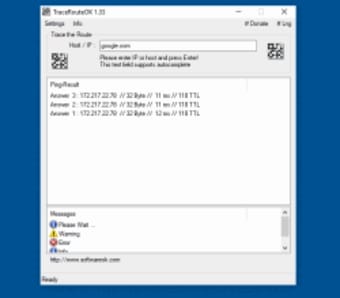
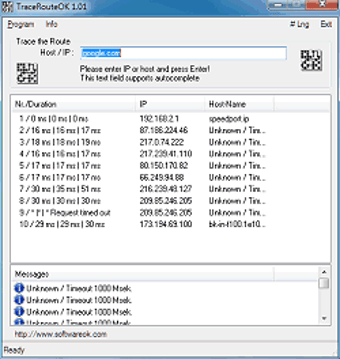
This data solution only does one job—conduct traceroute operation. It’s a more straightforward and functional alternative to the Windows console’s ‘tracert’ command. It displays a user-friendly interface even for beginners as well as intuitive options that are easy to get to grips with. You only need to enter the preferred host or IP address and click the ‘Enter’ button to track down the data path sent and received data packets travel.
Afterward, it will then analyze the path of the transferred data using an organized table that contains all relevant retrieved information. For one, it will present you the IP address along with its corresponding hostname for every node. At the same time, it will pinpoint transit delays of the transmitted packet across the Internet Protocol network. The granted list can be exported to HTML format and saved locally.
Identify underlying connection issues
TraceRouteOK is a highly efficient software that can keep track of your internet or local network data. Having this as an alternative to tracert is a great idea as it is easier to use and learn. Worry not about the amount of space it can occupy as it is really lightweight and can even be preserved and launched on any type of USB storage device.



.png)